
The Timer is the heart of Paxalia – a simple but powerful tool for tracking focus sessions. It records your start time, total work time, and uploads completed sessions to your calendar.
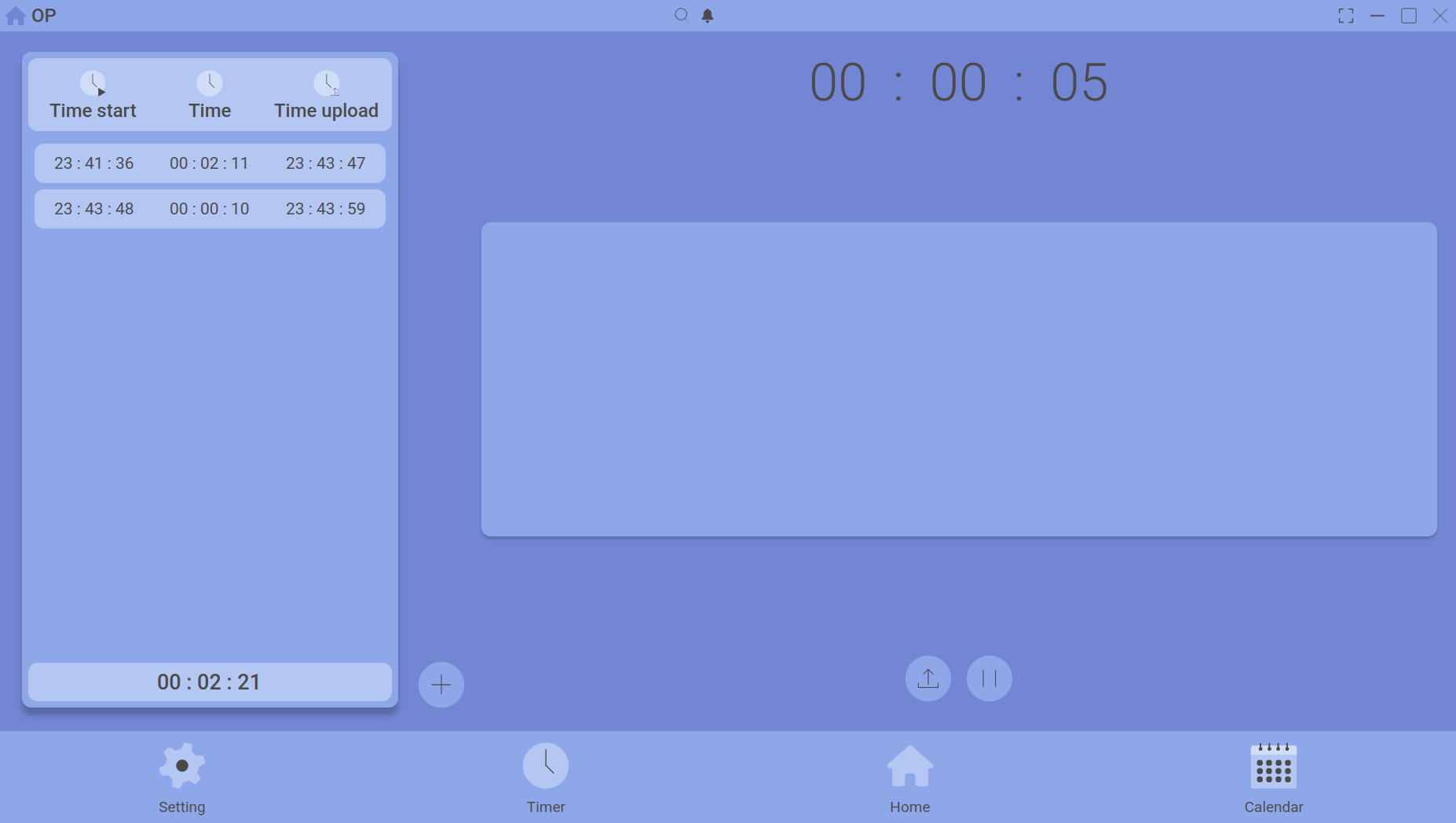
The main timer screen with Start, Pause, and Upload buttons.
Controls
| Button | Action |
|---|---|
| Start | Begins a new focus session. The clock starts counting up. |
| Pause | Temporarily stops the timer. Use this for breaks. The clock freezes until you resume. |
| Resume | Continues a paused session from where it left off. |
| Upload | Ends the session and saves it to today’s timeline. The session appears in your calendar and home dashboard. |
The three time displays
The timer shows three different time values at once:
- Time Start – the clock time when you began the session.
- Time – the current running duration (or total work time after pausing).
- Time Upload – the actual work time after subtracting all pause durations. This is what gets saved to your records.
After uploading
Once you upload a session, it moves to the Timeline section of today’s calendar. From there you can view details, add notes, or attach goals.
Need to attach a specific category to your session? Read the Timeline & Timing guide.